Calendar-first budgeting for real-life cash timing

Budget by calendar, not by guessing.

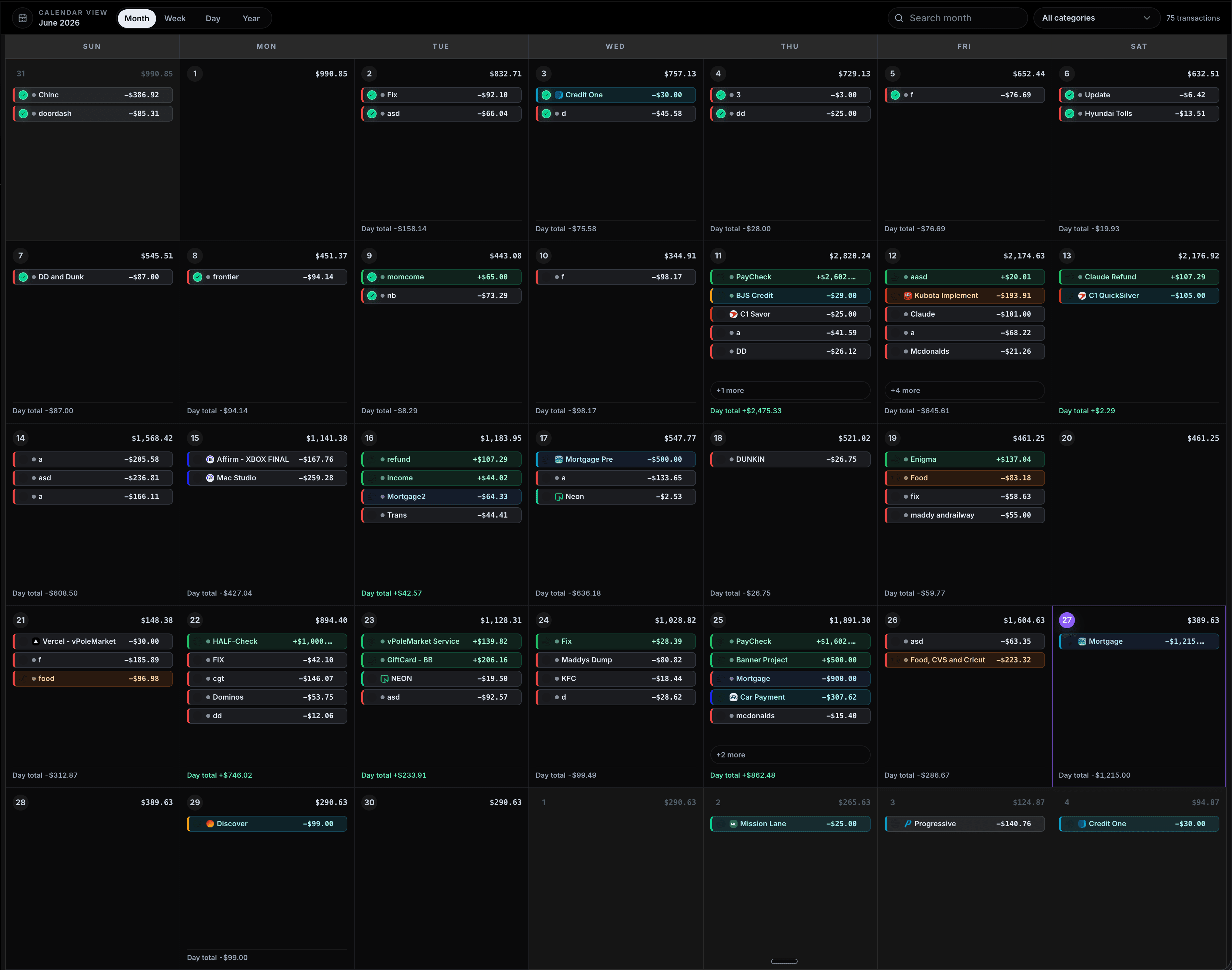
CalBudget is a budget calendar app for planning bills, paychecks, subscriptions, and spending by date. This page explains how CalBudget turns a month into a day-by-day cash-flow forecast, why timing matters, and how the product works without a bank login.

Now available for iPhone and iPad
Download on the App Store
0
bank logins required
$2.99
monthly plan
7 days
annual trial
1
future balance calendar
No bank login Daily forecast Recurring bills Private by design
calbudget.com/calendar/2026/03
RUNNING BALANCE
$8,429
high $8,573
low $2,219
Today · $8,429
Sun
Mon
Tue
Wed
Thu
Fri
Sat
1$2,252.58
2$2,237.59
3$2,219.20
4$2,219.20
5$5,459.20
6$5,414.20
7$5,286.36
8$5,192.14
9$5,112.15
10$5,082.16
11$5,023.85
12$4,953.46
13$4,566.46
14$4,547.71
15$5,381.72
16$5,290.29
17$5,256.10
18$5,250.50
19$8,490.50
20$8,449.50
21$8,252.00
22$8,200.22
23$8,110.82
24$8,072.83
25$8,572.83
26$8,429.21
27$8,394.21
28$8,235.22
29$8,035.22
30$8,021.23
31$7,999.13

Drag a transaction, or select one and move it by day.

Select a transaction, then move it by day or choose a calendar day.

Product demo

Now it is the product demo.

The calendar that starts as the hero visual lands here as the interactive product preview. Drag a bill, shift a payment, or select a transaction and move it by day.

1

Rent

Balance after: $1,020

-$1,850

5

Paycheck

Balance after: $4,238

+$3,240

8

Electric

Balance after: $3,914

-$94

13

Car

Balance after: $3,231

-$387

Why budget apps miss the moment

The problem is timing, not just spending.

A category budget tells you where money went. A calendar budget shows whether the account survives the days between paychecks.

Will rent hit before payday?
What is my lowest balance this month?
Can I move that bill two days?
Which day gets tight?
Will rent hit before payday?
What is my lowest balance this month?
Can I move that bill two days?
Which day gets tight?
Will rent hit before payday?
What is my lowest balance this month?
Can I move that bill two days?
Which day gets tight?
Will rent hit before payday?
What is my lowest balance this month?
Can I move that bill two days?
Which day gets tight?
How much survives after subscriptions?
What happens if groceries move?
Can I afford the car payment?
When does the next paycheck help?
How much survives after subscriptions?
What happens if groceries move?
Can I afford the car payment?
When does the next paycheck help?
How much survives after subscriptions?
What happens if groceries move?
Can I afford the car payment?
When does the next paycheck help?
How much survives after subscriptions?
What happens if groceries move?
Can I afford the car payment?
When does the next paycheck help?
Which bill creates the dip?
What does the month look like ahead?
Do I need to delay a payment?
Is the account safe until Friday?
Which bill creates the dip?
What does the month look like ahead?
Do I need to delay a payment?
Is the account safe until Friday?
Which bill creates the dip?
What does the month look like ahead?
Do I need to delay a payment?
Is the account safe until Friday?
Which bill creates the dip?
What does the month look like ahead?
Do I need to delay a payment?
Is the account safe until Friday?

Totals hide tight days

Category budgets can look healthy while the account gets squeezed between rent, groceries, and the next deposit.

Timing becomes visible

Every bill, paycheck, subscription, and planned purchase sits on the date it actually changes your balance.

Plans are easy to adjust

Drag a transaction, shift a payment, and see the projected balance change without rebuilding a spreadsheet.

The forecast is the point

CalBudget looks forward, so you can spot the lowest future day before the bank app tells you what already happened.

Financial clarity

The number that matters is the lowest future day.

CalBudget carries your balance forward after every planned transaction so you can see the low point, not just the end of the month.

Projected balance this month

$6,287

Low day: $1,020
Day 1Day 8Day 19Day 31

Features

Everything points back to the calendar.

The toolset is intentionally focused: plan real dates, forecast the balance, repeat predictable transactions, and keep the month understandable.

Calendar-based planning

Bills, paychecks, subscriptions, and spending live on the dates they actually affect your account.

Daily balance forecast

Every day shows the projected balance after planned transactions clear.

Recurring rules

Set monthly rent, biweekly paychecks, weekly groceries, and annual renewals once.

Drag-and-drop timing

Move a payment and instantly see how it changes the rest of the month.

CSV import

Bring in bank exports when history helps, without giving a third party your bank login.

Debt payoff planning

Plan minimums and extra payments without breaking the cash-flow calendar.

Trust model

Built for people who want control, not another bank connection.

CalBudget is manual-first by design. Add what you know, import when useful, and keep your forecast easy to understand.

No bank login required

Simple monthly or annual pricing

Cancel anytime

Private by design

Simple enough to keep using

$2.99/month or $29.99/year. One plan includes every core feature.

Source basis

Built around dated cash-flow risk, not generic budget advice.

CalBudget’s homepage claims are tied to the product’s own demo data and to public consumer-finance sources. The page does not claim customer outcomes, review scores, or independent awards.

The CFPB defines the core risk plainly: “An overdraft occurs when you don’t have enough money in your account to cover a transaction.”

Consumer Financial Protection Bureau, Ask CFPB

Original demo methodology

The sample forecast is an illustrative CalBudget month.

The numbers shown on this page are product-demo data, not customer analytics. They demonstrate how dated transactions change a running balance.

Day 1

-$1,850

Rent

Shows the immediate pressure point at the start of the month.

Day 5

+$3,240

Paycheck

Shows how income timing changes the rest of the forecast.

Day 8

-$94

Electric

Shows ordinary fixed bills as dated events.

Day 13

-$387

Car payment

Shows why payment timing matters before the next paycheck.

Day 19

+$3,240

Paycheck

Shows the second income event in the sample month.

Day 28

-$156

Insurance

Shows late-month obligations before the next cycle.

Pricing

One calm plan.

Choose monthly for $2.99, or annual for $29.99 with a 7-day trial. All core calendar, import, report, and debt tools are included.

Everything needed to build your month:

Daily running balance view
Multi-month cash flow projection
Recurring transaction engine
Category tracking & monthly reports
CSV bank import
Unlimited transactions & accounts
Quick-add bookmarks
Mobile-friendly interface
No bank login required
No card required for the annual trial
Cancel anytime
One plan includes every core feature

Billing period

Annual starts with 7 days free and saves $5.89 compared with 12 monthly payments.

7-day free trial
$29.99/yr

That's $2.50/mo, billed annually.

Compared with monthly

$35.88

regular yearly equivalent

No card today. Access pauses after 7 days until payment is added.

FAQ

A few things people ask first.

The short version: no bank login, no complicated tiers, and no need to rebuild your budget from scratch every month.

No. CalBudget is manual-first. You enter your balance and planned transactions yourself, and you can import CSV exports when history helps.

It is the projected balance for each calendar day after that day's bills, income, and planned spending clear. It turns "will I have enough?" into something you can answer before the day arrives.

It solves the same cash-flow forecasting job people often build in spreadsheets, but the calendar, recurring rules, running balance math, and rescheduling workflow are built in.

Yes. Add expected income on the dates you expect it, then update the amount or date when reality changes. The forecast is a working plan, not a promise.

Yes. You can create multiple accounts and switch between their calendars, balances, reports, and transaction history.

Set a frequency such as weekly, biweekly, monthly, or yearly, and CalBudget creates future occurrences so your calendar stays forecastable.

CalBudget starts with a 7-day free trial. No card is required. After the trial, continue for $2.99 per month or $29.99 per year.

Access pauses after the 7-day trial until payment is added. Your plan is not deleted just because the trial ends.

Yes. You can cancel your subscription any time, and you will keep access through the end of the billing period you already paid for.

Yes. CalBudget is built to work in a mobile browser, including Safari on iPhone, so you can update your budget without installing an app.

CalBudget helps you schedule minimums and extra payments against your real cash-flow calendar. It does not give financial advice, but it makes the timing impact visible.

Yes. You can import CSV exports from your bank or another budget tool, then review and categorize the transactions in CalBudget.

No. CalBudget is a planning and tracking tool, not a financial advisor. It helps organize your information so you can make your own decisions.

Build your first useful month today

Know the balance before the day arrives.

Add the bills and paychecks you already know, then let the calendar show the rest of the month.

Download on the App Store